
Install in a staging CRM first.
Use the inner module ZIP, then activate and configure the module in Perfex.
01Requirements
- An existing licensed Perfex CRM installation; this download does not include Perfex.
- PHP 8.1 or later with mbstring and the extensions required by your Perfex installation.
- A working Perfex database, configured email transport and scheduled Perfex cron.
- HTTPS for customer-facing links and access to back up the CRM files and database.
Optional AI requires your own provider account/key or a compatible endpoint reachable from the CRM server. Provider usage and hosting are separate. No key is included. Composer is not required to install the module; it is only needed to run the automated tests in source/.
02Who pays for what
The item price covers the module, this documentation and its updates. The costs below are not included in the price. You pay them to their providers, never to the author.
- Perfex CRM licence and hosting, bought separately from Perfex's author and your host.
- Outgoing e-mail. Invitations use the mail settings your Perfex already uses. If those run through a paid mail service, its pricing applies.
- Review sites. Your own accounts on the review sites you link to.
- Optional AI drafts. Off by default. When switched on, the provider you choose bills its usage to your own account; Ollama on your own server has no per-use fee. Settings cap the calls per month and per staff member per day. See Optional AI drafts.
03Install and activate
- Back up. Take a recoverable backup of CRM files and the database. Use a staging copy first.
- Extract the buyer download. Locate
upload/review_booster.zip. Do not upload the complete buyer packet as a module. - Upload the module. Open Perfex Setup → Modules and upload the inner ZIP. If your host requires manual installation, extract the
review_boosterfolder into the CRM'smodules/directory, keepingmodules/review_booster/review_booster.php. - Activate. Activate Review Booster in Setup → Modules. Activation creates module tables and options; it does not modify Perfex core files.
- Set access. Give staff the Review Booster permissions appropriate for their role. Open the Review Booster menu as an administrator.
04Configure before sending
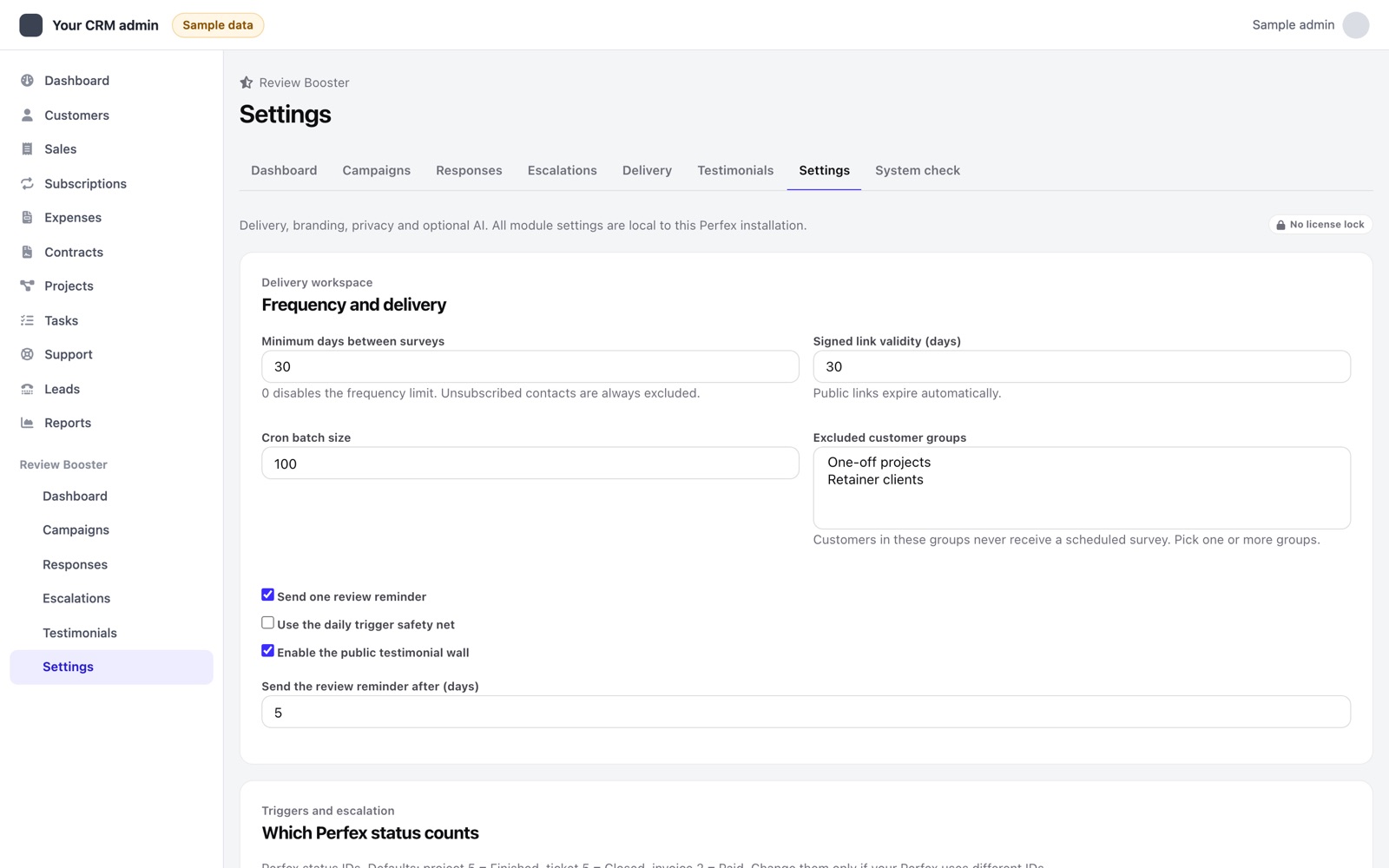
In Review Booster Settings, confirm sender name, logo, colour, link lifetime, batch size, frequency limit, excluded customer groups, review reminder settings and the manager to notify. Verify your finished-project, closed-ticket and paid-invoice status IDs against your CRM. Defaults are 5, 5 and 2; custom installations may differ.
Configure Perfex's normal cron job using the instructions supplied with your Perfex version. Review Booster attaches its work to Perfex cron; it has no separate buyer cron command. Check the latest cron activity in the module, then follow your first feedback cycle.
05Update, deactivate and uninstall
Before replacing files, back up and pause campaigns, allow any in-progress mail operation to finish, then deactivate the module. Replace only modules/review_booster, reactivate and repeat the staging walkthrough. Activation brings the database up to the new version: missing tables are created and new columns are added; existing tables and data are never dropped or rewritten. Open System check afterwards. Retain the CRM database and its encryption configuration so stored settings remain usable.
Deactivation keeps module data. Uninstall removes the module's tables and options, including surveys, answers, recovery history, testimonials and settings. Export required records and back up first. Existing Perfex customer records are not removed.